Since v2.6 Leaflet Maps Marker also support bing maps as basemaps for marker and layer maps. In order to enable bing maps support, you have to do the following steps:
- to get a free Bing Maps key, please follow this instructions first
- enter your bing API key at Settings / Layers / “Bing Maps”:
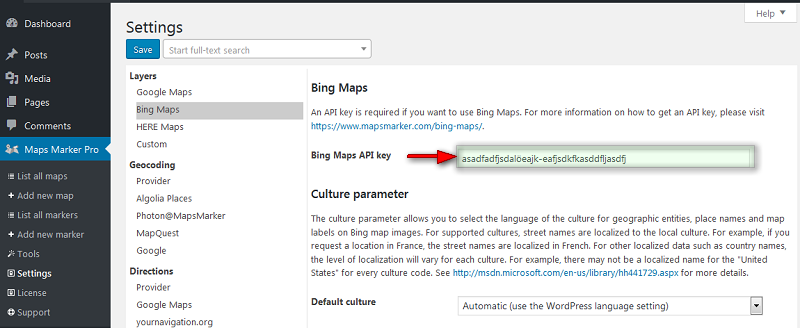
Optionally you can navigate to “Bing Culture Parameter” and set the language of the culture for geographic entities, place names and map labels on bing map images.
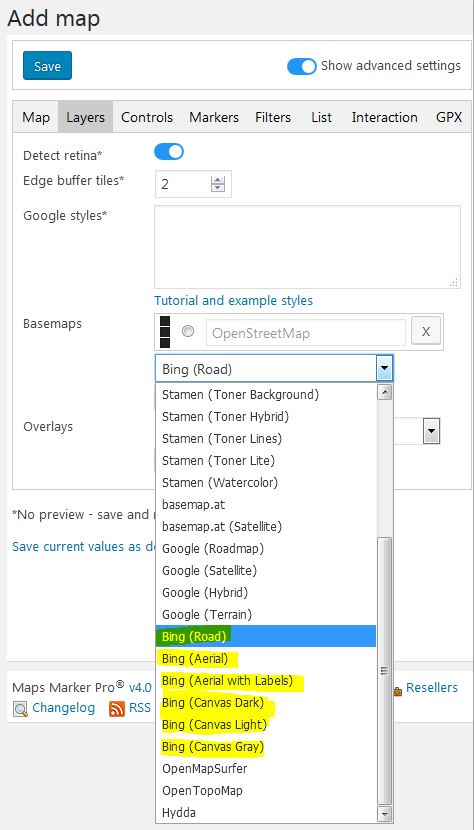
- you can now select bing basemaps when creating a new map from the “layers” tab:
Updated on 29 May 2022