
We are pleased to announce the release of Maps Marker Pro v4.32. This update introduces a comprehensive activity log for tracking changes to maps and markers, alongside key optimizations and bug fixes designed to enhance overall performance and stability.
Updating to the latest version is highly recommended to ensure your plugin operates securely and at peak performance. If your access to updates and support has expired, please click here to learn how to renew your access. While your core license key never expires, an active subscription is required to receive new features, performance optimizations, security patches, translation updates, and access to our dedicated 1:1 helpdesk support.
Maps Marker Pro now features an audit log that allows you to easily monitor activities and changes related to your markers, maps, and tools.
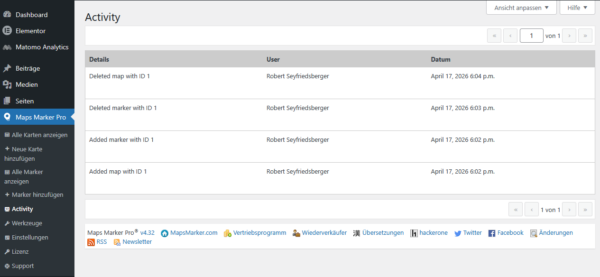
Configuration: This feature is enabled by default. You can optionally disable it by navigating to Settings > Misc > WordPress Integrations.

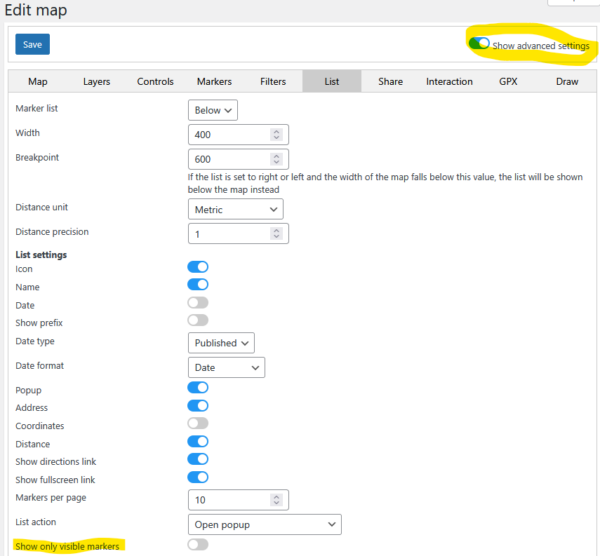
We have improved the list of markers displayed below the map, giving you the ability to filter the list so it only displays markers currently visible within the map’s viewport.
Configuration: To enable this on a specific map, click on Show advanced settings and check the Show only visible markers option.
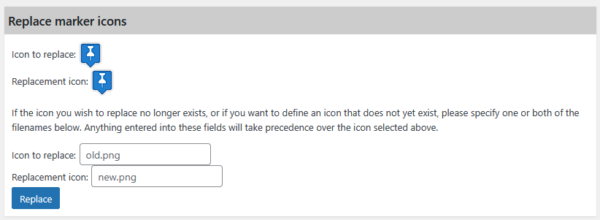
The icon replacement utility has been upgraded to provide greater flexibility. You can now define non-existent or missing images for icon replacements, streamlining how you manage your custom map assets.
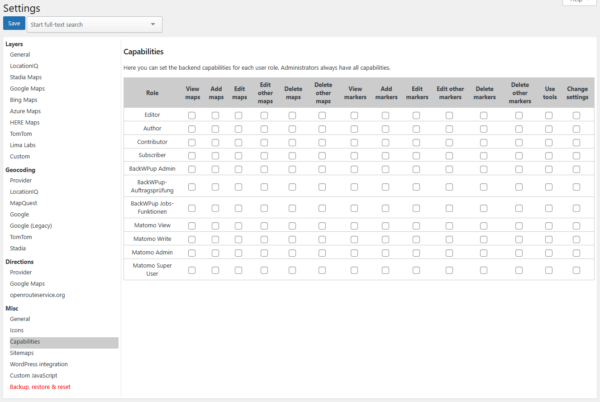
The user capability system has been optimized to offer finer, more granular control over user permissions. Administrators can now precisely define the specific Maps Marker Pro capabilities assigned to each individual WordPress user role.
Configuration: These options can be managed by navigating to Settings > Misc > Capabilities.
Thanks to our translators this release also includes updated translations, see full changelog for details.
If you want to join our team of more than 235 translators and contribute to translations (in exchange for free licenses) , please visit https://www.mapsmarker.com/glotpress/projects/mmp/ for more information.
Changelog for version 4.32 - released on 17.04.2026 (release notes)
 | add activity log | |
| add parsing of z-index offset to marker options | |
| add option to define non-existent images for icon replacement tool | |
| add option to only show visible markers in list of markers | |
| add bounds filter to DB API | |
 | improve capabilities system | |
| update Tom Select to 2.5.2 | |
| update Leaflet-Geoman to 2.19.3 | |
| update autoComplete.js to 10.2.10 | |
| update leaflet-locatecontrol to 0.89.0 | |
 | add workaround for default attribution not being removed when switching basemaps | |
| fix not being able to change settings for newly created shapes before saving map | |
| fix changes to popup for shapes not properly reflected in live preview when editing map | |
| fix edge case causing filters control temporarily showing custom sorting inversed on edit map page | |
| fix custom filter order not being retained on edit map page | |
| fix AJAX request firing when opening empty marker popup | |
| fix margins on condensed attribution when shown in top corners | |
| fix advanced map settings state not being loaded correctly | |
| prevent edge case where logged out users would see marker edit link | |
 | updated Catalan translation thanks to Roc, Efraim Bayarri, Vicent Cubells and Marta Espinalt | → contribute |
| updated Chinese translation thanks to John Shen and ck | → contribute |
| updated Danish translation thanks to Mark Aabo Pedersen, Mads Dyrmann Larsen and Peter Erfurt | → contribute |
| updated Dutch translation thanks to Ronald Smeets, Marijke Metz, Patrick Ruers, Fokko van der Leest and Hans Temming | → contribute |
| updated German translation by Maps Marker Pro team and Daniel Luttermann | → contribute |
| updated Finnish translation thanks to Jessi Björk | → contribute |
| updated French translation thanks to Vincèn Pujol, Rodolphe Quiedeville, Fx Benard, Cazal Cédric, Fabian Hurelle and Thomas Guignard | → contribute |
| updated Galician translation thanks to Fernando Coello, Jorge Castro Ruso | → contribute |
| updated Hungarian translation thanks to István Pintér and Csaba Orban | → contribute |
| updated Italian translation thanks to Luca Barbetti and Angelo Giammarresi | → contribute |
| updated Japanese translations thanks to Shu Higash and Taisuke Shimamoto | → contribute |
| updated Russian translation thanks to Ekaterina Golubina (supported by Teplitsa of Social Technologies - http://te-st.ru) and Vyacheslav Strenadko, http://slavblog.ru | → contribute |
| updated Slovenian translation thanks to Igor Čabrian | → contribute |
| updated Spanish translation thanks to David Ramírez, Alvaro Lara, Victor Guevara, Ricardo Viteri, Juan Valdes & Marta Espinalt and Fernando Coello | → contribute |
| updated Turkish translation thanks to Emre Erkan, Mahir Tosun and Cagatay Demir | → contribute |
If you experience any issues, please search our knowledge base or submit a helpdesk ticket.
Happy mapping!

The recommended way to update is to use the WordPress update process: login with an user who has admin privileges, navigate to Dashboard / Updates, select plugins to update and press the button “Update Plugins”. The pro plugin checks every 24 hours if a new version is available. You can also manually trigger the update check by going to Plugins and clicking on the link “Check for updates” next to “Maps Marker Pro”.
If there is an update available, please start the update by clicking the link “update now”.

No additional changes needed (as there was no beta release for this release).
No additional actions are required for Database API users when updating to this version.
For directly downloading and installing the Maps Marker Pro as zip file, please click here.
For the SHA-256 hash value and the number of files for this release please check the following file: https://www.mapsmarker.com/SHA256.txt
This file is digitally signed with our PGP key, key signature file available at https://www.mapsmarker.com/SHA256.txt.sig
Click here for a tutorial on how to verify the integrity of the plugin package (recommended if the plugin package for a new installation was not downloaded from https://www.mapsmarker.com – verification is not needed though if the automatic update process is used).
Let us know what you think about this new release by submitting a review or leaving a comment below!
If you want to keep up to date with the latest Maps Marker Pro development, please subscribe to news via RSS or to our email newsletter or follow @MapsMarker on twitter or on Facebook.
We would also like to invite you to join our affiliate program which offers commissions up to 50%. If you are interested in becoming a reseller, please visit https://www.mapsmarker.com/reseller